
Timeline
Your timeline shows all your connected records in date order. To narrow it down, use the filters to show only certain record types, such as routine visits, specialist visits, unplanned visits, diagnostics (labs, imaging, and procedures), or immunizations.
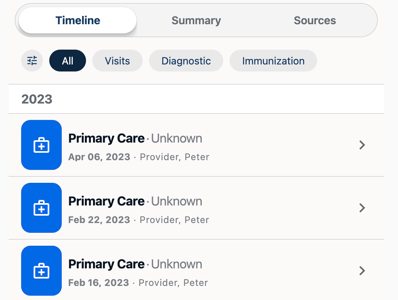
To filter your timeline:
-
Tap the filter button at the left of the filter row. It shows All or, when filters are on, how many are selected (for example, 2 Selected).
-
In Filter and Sort, tap one or more record types. Selected types show an ×.
-
Tap Continue. The timeline updates to show only those records.
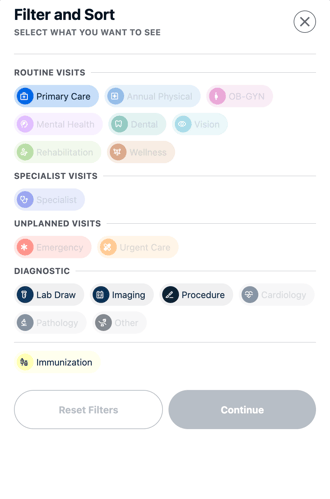
Record types that appear faded have no records in your Wallet, so you can’t select them. To clear your selections, tap Reset Filters.
To switch between broad groups without opening Filter and Sort, tap All, Visits, Diagnostic, or Immunization in the row above your timeline.
View a Record
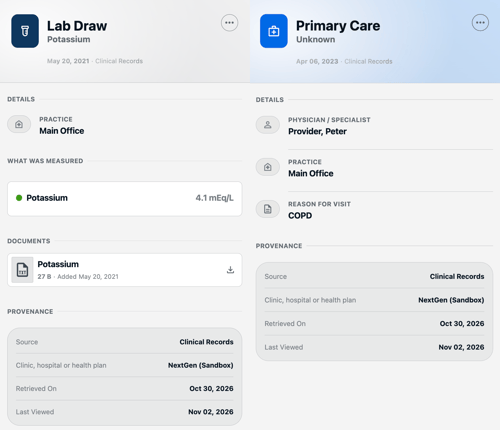
Tap any record to see its details. What you see depends on the type of record and can include the physician or specialist, practice, reason for visit, what was measured, and any attached documents.
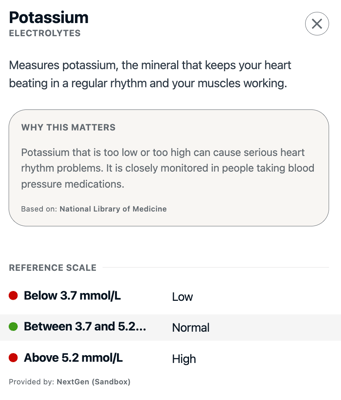
For some records, tap what was measured to see more.
Every record also has a Provenance section that shows where it came from: the source, the clinic, hospital, or health plan, when the record was retrieved, and when you last viewed it.
Summary
The Summary tab gives you a quick, compact view of your health details from all your connected records, so you don’t have to scroll through the timeline. It has three sections:
-
Conditions: Your diagnoses, each marked Active or Inactive, with the date
-
Medications: Your medications with dosage instructions, also marked Active or Inactive, with the date.
-
Vitals & Measurements: Your most recent results, such as lab values and test outcomes.
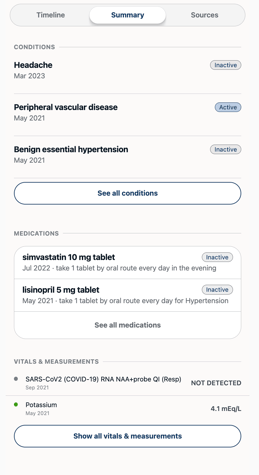
Each section shows a few recent items. To see everything, tap See all conditions, See all medications, or Show all vitals & measurements.