---
title: Revoke data sharing consent
description: Learn how to stop sharing your health data with an organisation by revoking consent directly from your HealthEx account.
---
[Skip to content](https://support.healthex.io/kb/revoke-data-sharing-consent#main-content)
English - United States
Show submenu for translations
[](https://www.healthex.io/)
Open main navigation
Close main navigation
- English - United States
Show submenu for translations
- [Create a Ticket](https://healthex.io/support)
[Create a Ticket](https://healthex.io/support)
How can we help you?
- There are no suggestions because the search field is empty.
1. [HealthEx Support](https://support.healthex.io/kb?hsLang=en-us)
2. [How-to guides](https://support.healthex.io/kb/how-to-guides?hsLang=en-us)
# Revoke data sharing consent
## Stop sharing your health data with an organization at any time directly from your HealthEx account.
**Steps to revoke data sharing consent**
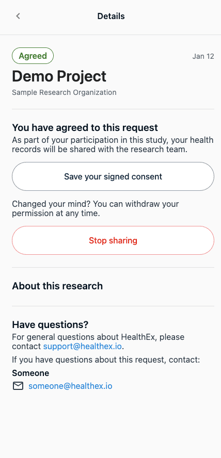
1. Log in to your HealthEx account at app.healthex.io
2. Navigate to the **Sharing** tab or go directly to app.healthex.io/#/patient-sharing
3. Find the organization you want to stop sharing data with
4. Click **Stop sharing**
****
**What happens next**
Your health data will no longer be shared with that organization immediately after revoking consent. They will lose access to any records previously shared.
**Need to re-enable sharing?**
You can reconnect and grant consent again at any time from the same Sharing tab or through the enrollment link received via text or email from that organization.
- [FAQs](https://support.healthex.io/kb/faqs?hsLang=en-us)
- [Getting started](https://support.healthex.io/kb/getting-started?hsLang=en-us)
- [How-to guides](https://support.healthex.io/kb/how-to-guides?hsLang=en-us)
- [Integrations](https://support.healthex.io/kb/integrations?hsLang=en-us)
Copyright © 2026, HealthEx