---
title: Connect a health provider
description: Learn how to link your hospital, clinic, or health plan to your HealthEx account to start syncing your health records.
---
[Skip to content](https://support.healthex.io/kb/how-to-connect-a-health-provider#main-content)
English - United States
Show submenu for translations
[](https://www.healthex.io/)
Open main navigation
Close main navigation
- English - United States
Show submenu for translations
- [Create a Ticket](https://healthex.io/support)
[Create a Ticket](https://healthex.io/support)
How can we help you?
- There are no suggestions because the search field is empty.
1. [HealthEx Support](https://support.healthex.io/kb?hsLang=en-us)
2. [How-to guides](https://support.healthex.io/kb/how-to-guides?hsLang=en-us)
# Connect a health provider
This guide is for manually connecting health providers that weren't automatically detected, or if you signed up using Google or Microsoft login without completing CLEAR identity verification.
**Steps to connect a health provider**
1. Log in to your HealthEx account at app.healthex.io
2. Click **Add a provider
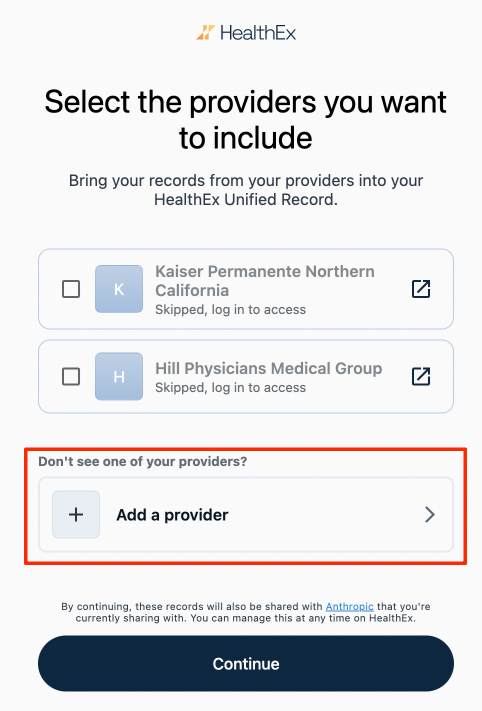**
3. Search for your provider by name, clinic, hospital, or health plan. Use the filter icon next to the search bar to define your search radius by city or zip code
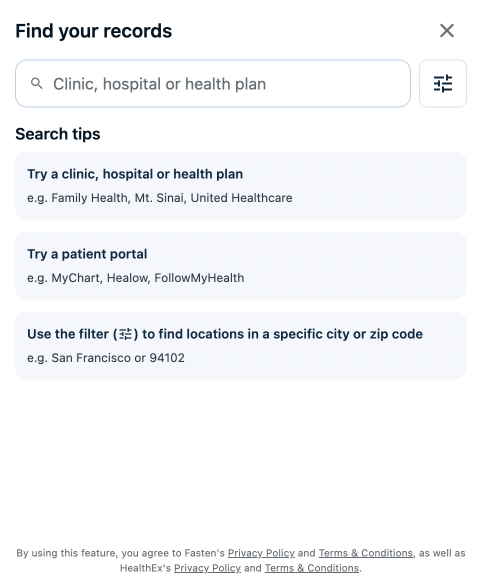
4. Select your provider from the results
5. Log in to your provider's patient portal to authorize access
**What happens next**
Once connected, your records will appear in your HealthEx dashboard. You may see lab results, visit summaries, medications, and more depending on what your provider shares.
**Can't find your provider?**
If your provider isn't listed, click **Add a provider** at the bottom of the list and submit a request. We'll work on adding them.
- [FAQs](https://support.healthex.io/kb/faqs?hsLang=en-us)
- [Getting started](https://support.healthex.io/kb/getting-started?hsLang=en-us)
- [How-to guides](https://support.healthex.io/kb/how-to-guides?hsLang=en-us)
- [Integrations](https://support.healthex.io/kb/integrations?hsLang=en-us)
Copyright © 2026, HealthEx