---
title: Delete my HealthEx account
description: Learn how to permanently delete your HealthEx account and remove your health records from our platform.
---
[Skip to content](https://support.healthex.io/kb/delete-my-healthex-account#main-content)
English - United States
Show submenu for translations
[](https://www.healthex.io/)
Open main navigation
Close main navigation
- English - United States
Show submenu for translations
- [Create a Ticket](https://healthex.io/support)
[Create a Ticket](https://healthex.io/support)
How can we help you?
- There are no suggestions because the search field is empty.
1. [HealthEx Support](https://support.healthex.io/kb?hsLang=en-us)
2. [How-to guides](https://support.healthex.io/kb/how-to-guides?hsLang=en-us)
# Delete my HealthEx account
## Delete your HealthEx account and remove your records from the platform.
**Steps to delete your account**
1. Log in to your HealthEx account at app.healthex.io
2. Go to the Home screen at app.healthex.io/#/patient-home
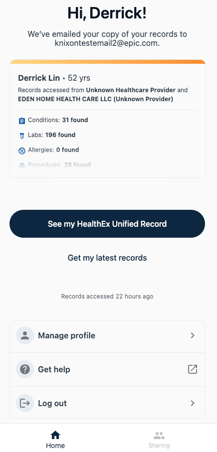
3. Select **Manage Profile**
4. Scroll down and tap **Delete my account**
5. Select a reason for leaving
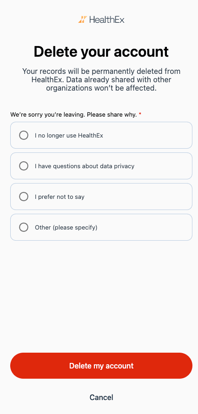
6. Tap **Delete my account** to confirm
**What happens after deletion**
Your records will be permanently deleted from HealthEx. Data already shared with other organizations won't be affected.
**Changed your mind?**
Tap **Cancel** on the confirmation screen to go back without deleting your account.
- [FAQs](https://support.healthex.io/kb/faqs?hsLang=en-us)
- [Getting started](https://support.healthex.io/kb/getting-started?hsLang=en-us)
- [How-to guides](https://support.healthex.io/kb/how-to-guides?hsLang=en-us)
- [Integrations](https://support.healthex.io/kb/integrations?hsLang=en-us)
Copyright © 2026, HealthEx